

Facets
Your server holds work that needs someone: drafts awaiting review, tasks
blocked, invoices unpaid. A facet is one of those, as a number. The
workspace overview shows each facet whose count is above zero as one row,
<count> <title>, and clicking it opens your app.
Facets are an MCP extension,
ai.nimblebrain/facets, built on the core Resources primitive. It adds no
method. You advertise the extension, list each facet as a resource carrying a
_meta marker, and answer resources/read with a count. You need no
NimbleBrain SDK, and nothing goes in your catalog entry or manifest.
1. Advertise the extension
Section titled “1. Advertise the extension”Declare the resources capability and put the extension in the extensions
map of your server capabilities, with an empty settings object:
{ "capabilities": { "resources": {}, "extensions": { "ai.nimblebrain/facets": {} } }}Where that map travels depends on the protocol revision the connection
negotiated: on 2026-07-28 it is in the server/discover result, and on a
2025-era connection it is in the initialize result. Advertise on every
revision you serve. The host reads the map from wherever the connection carries
it, and negotiates 2026-07-28 with any server that offers it.
The host advertises the extension in its own client capabilities (in
initialize on a 2025-era connection, in each request’s client capabilities on
2026-07-28). You may use that to skip listing facet resources to a host that
will not read them.
The host reads a resource as a facet only when your server advertised the extension. A marked resource from a server that did not is an ordinary resource.
2. List each facet as a resource
Section titled “2. List each facet as a resource”Each facet is one entry in your resources/list result, carrying the extension
identifier as a _meta key:
{ "uri": "acme://facets/drafts-awaiting-review", "name": "drafts-awaiting-review", "title": "Drafts awaiting review", "mimeType": "application/json", "_meta": { "ai.nimblebrain/facets": { "level": "warning" } }}| Field | Required | Rule |
|---|---|---|
uri |
Yes | Any URI you choose. The host never identifies a facet by its URI scheme or shape. |
name |
Yes | Stable within your server. The host caches by it. |
title |
Yes | The label, phrased so a count reads naturally before it: “Drafts awaiting review”, “Tasks blocked”. The host renders <count> <title>. |
mimeType |
Yes | Must be application/json. |
_meta["ai.nimblebrain/facets"] |
Yes | An object. The host tolerates fields it does not know. |
_meta["ai.nimblebrain/facets"].level |
No | How urgent a non-zero count is: critical, warning or info (below). Defaults to warning. |
Pick the level by what the count means, not by how big it is:
| Level | Use it when | Example | On the overview |
|---|---|---|---|
critical |
Something has stopped until someone acts | Tasks blocked, invoices overdue | Red, stop icon, listed first |
warning |
Someone should act; nothing has stopped | Drafts awaiting review | Amber, alert icon |
info |
Worth knowing; nothing is asked | Replies received | Muted, info icon, listed last |
The names are the RFC 5424 severity names MCP logging already uses, read as urgency on a count rather than the severity of a failure. The host reads a level it does not recognise as warning.
A marked entry without a title, or whose mimeType is not
application/json, is not a facet; the host skips it and logs why.
List as many facets as you like, or none. Keep the list stable. The host
re-reads your listing at most every five minutes and does not depend on
notifications/resources/list_changed, so a facet you add or remove shows up
within that interval.
3. Answer the read with a count
Section titled “3. Answer the read with a count”The host reads a facet with an ordinary resources/read on its uri, with no
arguments. Answer with one text content whose mimeType is
application/json and whose text is a JSON object holding count:
{ "contents": [ { "uri": "acme://facets/drafts-awaiting-review", "mimeType": "application/json", "text": "{\"count\": 3}" } ]}count must be a number that is a non-negative integer. The host ignores every
other field in version 1. Anything else (not JSON, not an object, a missing,
fractional, negative, or string count) is a failed read of that facet.
Count for the party the connection serves. The host reads over the connection it already holds for the workspace, which identifies the workspace and never a member, and shows every member the same number. Count what the whole workspace is waiting on, not what one person is. The extension carries no identity; do not accept one in the read.
Count at the source. The host reads every facet of every connected server
each time the overview renders (behind the cache below), so a read should be
quick: a count(*), not a page of rows you count afterwards.
What the host does
Section titled “What the host does”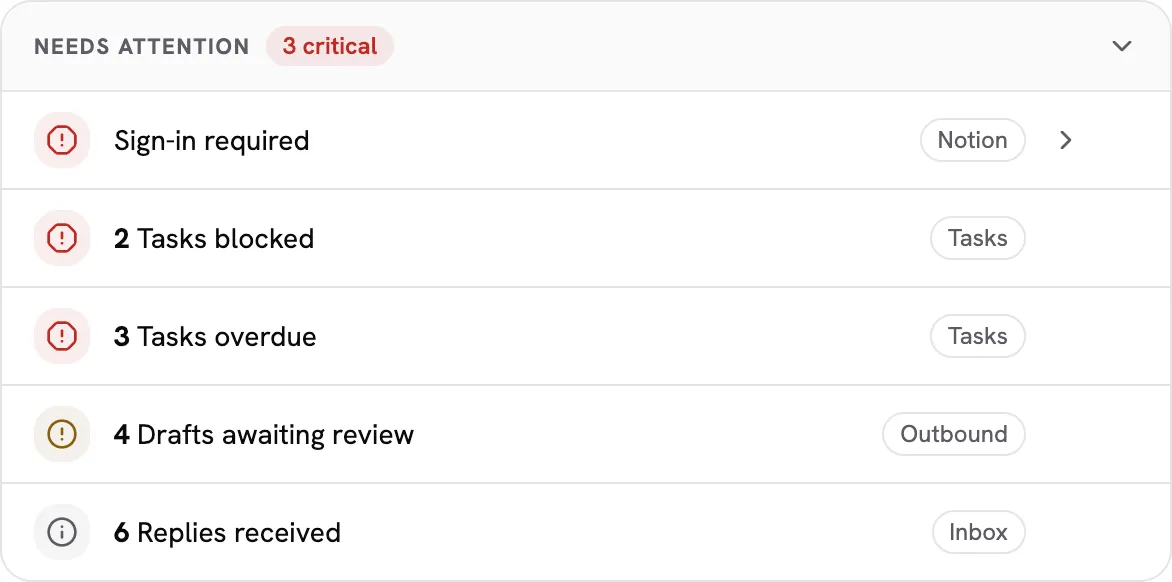
| Situation | Result |
|---|---|
| The count is above zero | One row in the overview’s “Needs attention” panel: <count> <title> with your facet’s level, opening your app’s first placement route. An app with no placement route shows the row without an action. Rows are ordered by level, then by the shell’s app order. |
| The count is zero | Nothing. |
| The read fails, returns an invalid count, or takes longer than 5 seconds | The title, marked unavailable. Your other facets, and every other server’s, render normally. |
| Your server did not advertise the extension | Nothing is listed or read. |
| Your connector is not connected in the workspace | Its facets are not read. Until it is ready (signed in, configured, connected), the overview shows its status in their place, opening the connector’s page. Reconnection needed, configuration required and failed show as critical; connecting and starting show as info. A connector that was never connected, or was disconnected on purpose, is at rest and shows nothing. |
| No facet anywhere in the workspace has a count, and every connector is ready | No panel at all. |
A member can hide a row until it changes and collapse the panel. Both are remembered in their own browser only, never on the server: a hidden row returns when its count rises or its connector’s status changes.
Counts are cached per workspace, server, and facet: a count is reused for 60 seconds, then served for up to 10 minutes while one fresh read runs in the background, and after that a failed read shows as unavailable. Concurrent loads of the same facet share one read.
The host treats title and count as untrusted data: the title renders as
text, never as markup, and the count renders as a number. Neither is passed to
a model as instruction.
Complete example
Section titled “Complete example”A TypeScript server on the MCP SDK (@modelcontextprotocol/server) with one
facet. Connect it to your transport as you would any other server.
import { Server } from "@modelcontextprotocol/server";
const FACETS = "ai.nimblebrain/facets";const DRAFTS_URI = "acme://facets/drafts-awaiting-review";
export function createServer(countDrafts: () => Promise<number>): Server {  const server = new Server(    { name: "acme-outbound", version: "1.0.0" },    { capabilities: { resources: {}, extensions: { [FACETS]: {} } } },  );
  server.setRequestHandler("resources/list", async () => ({    resources: [      {        uri: DRAFTS_URI,        name: "drafts-awaiting-review",        title: "Drafts awaiting review",        mimeType: "application/json",        _meta: { [FACETS]: { level: "warning" } },      },    ],  }));
  server.setRequestHandler("resources/read", async (request) => {    if (request.params.uri !== DRAFTS_URI) {      throw new Error(`Unknown resource: ${request.params.uri}`);    }    // One aggregate query for the workspace this connection serves.    const count = await countDrafts();    return {      contents: [{ uri: DRAFTS_URI, mimeType: "application/json", text: JSON.stringify({ count }) }],    };  });
  return server;}
With three drafts waiting, the overview shows 3 Drafts awaiting review, opening your app.
Compatibility and versioning
Section titled “Compatibility and versioning”- A host that does not implement the extension sees ordinary resources with a JSON body and may ignore them. A server that does not implement it lists no marked resources and shows nothing. Neither side rejects the other.
- This is version 1. New optional fields in the read result, the marker object
or the settings object keep the identifier;
levelis one. Removing or renamingcountortitle, changing their types, or adding a required field would ship under a new identifier (ai.nimblebrain/facets-v2).