

Notifications
Most of what a connector tells you, it tells you because you asked: you call a tool, it answers. Some things it learns on its own. A domain it ordered goes active twenty minutes later. A reply lands on a campaign. A bounce arrives at three in the morning.
Those arrive as notifications. A connector records them in its own outbox, the runtime reads that outbox on a schedule, and every item lands in the workspace’s inbox — visible to anyone who can reach that connector’s tools, and readable by the agent when you ask it what has come in.
Nothing leaves the workspace on its own. Sending an item to Slack, to mail, or into an agent run is a route, and a workspace admin writes it.
The inbox
Section titled “The inbox”Open Inbox under the workspace in the left navigation. The count beside it is how many items nobody has read yet.
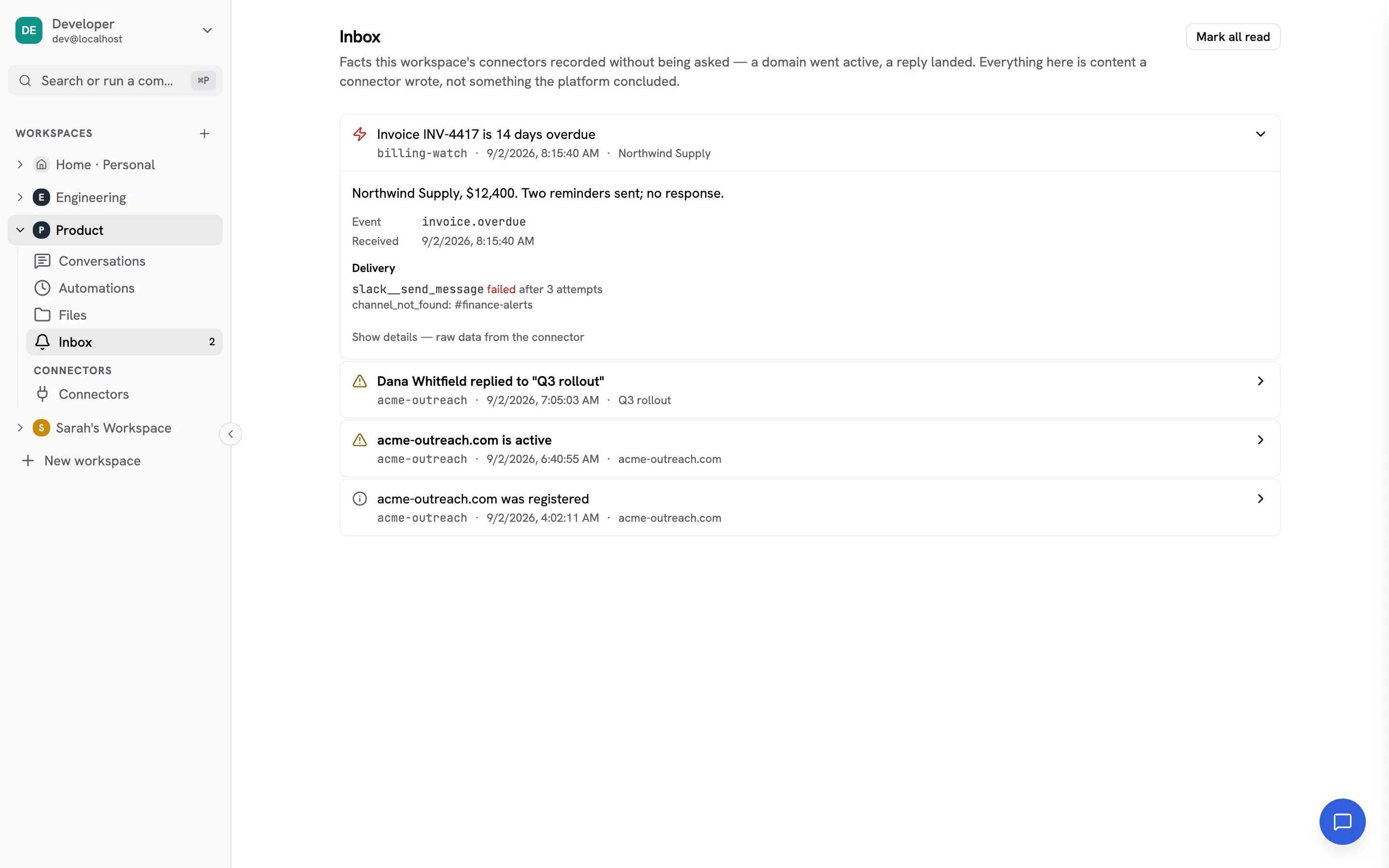
Items are grouped by urgency and then by arrival: urgent and attention sort
above info, and within a level the newest is first. Each row carries:
| Title | One line the connector wrote. Bold while unread. |
| Source | The connector that emitted it — the same name its tools carry. |
| Timestamp | When the connector says the fact happened. The expanded row also shows when this runtime received it. |
| Subject | What the item is about, when the connector says. Free text, used for grouping. |
| Level | info, attention or urgent. Advisory — the connector chose it. |
Open a row to see the body and the event name. Opening an item marks it read; Mark all read clears the rest.
Read state is shared across the workspace. A notification is something a connector recorded, not a message addressed to a person, so the inbox is one queue the whole workspace works through: when anyone opens an item it is read for everyone, and the row records who. If you want a per-person copy, a route is what makes one.
Under Show details is the connector’s own structured payload, as raw JSON. The runtime never reads a field of it; it is passed through untouched, and shown here so you can see what the connector actually sent.
The inbox holds 90 days. The view shows the most recent 100 items; ask the agent for older ones (“what notifications came in last month from acme?”) and it walks the backlog forward.
Live updates
Section titled “Live updates”The inbox updates itself while it is open, and re-reads the list whenever the event stream reconnects — the stream does not replay what it missed, so the re-read is what keeps a tab left open through a restart from showing a stale list.
Sources and the level ceiling
Section titled “Sources and the level ceiling”Settings → Notifications lists every connector in the workspace that declares an outbox, with the level ceiling it is held to. Workspace admins only.
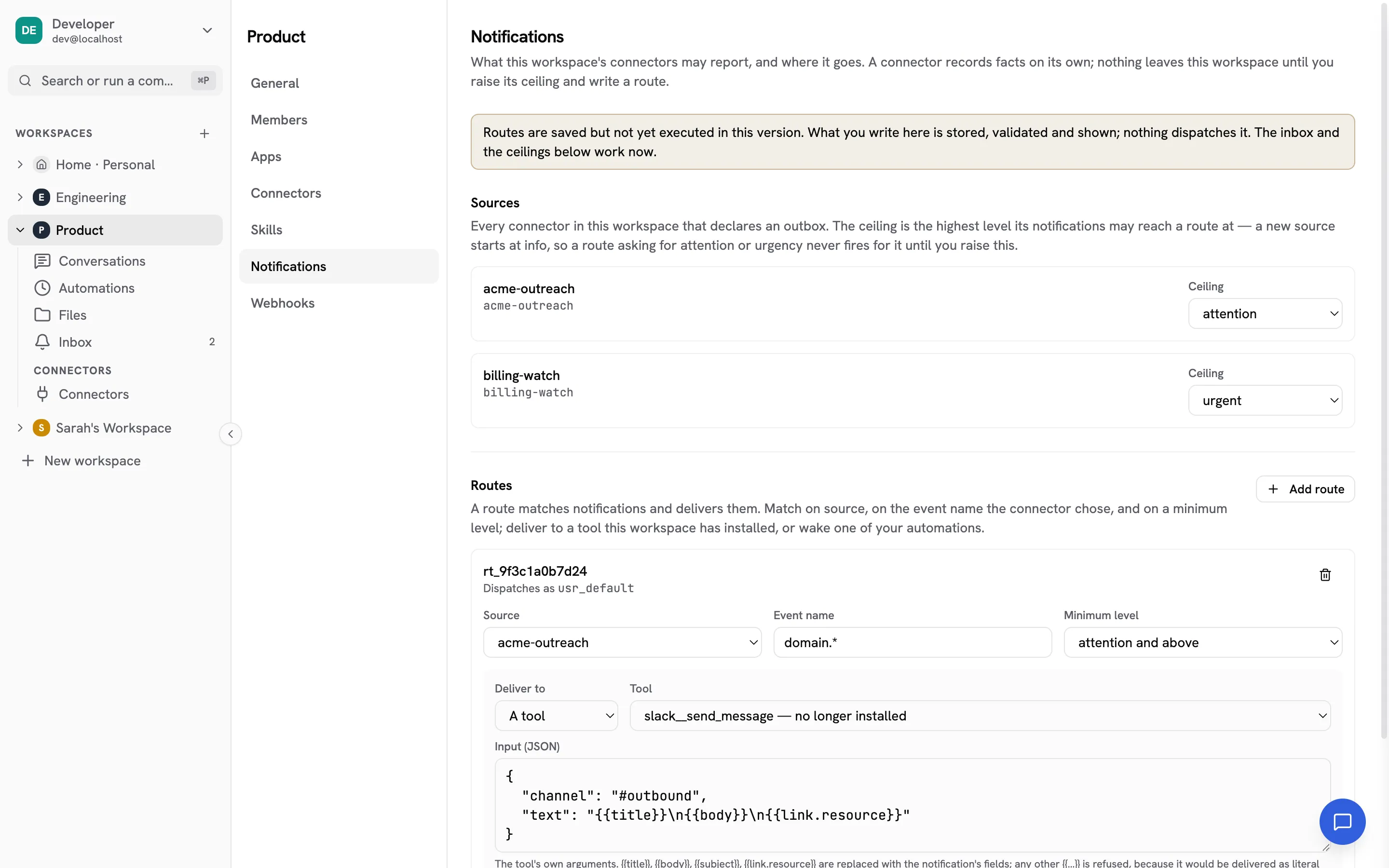
A newly declared source starts at info. Because a route matches on level as
a minimum, a route looking for attention or above never fires for that source
until an admin raises its ceiling. That is deliberate: installing a connector
that declares an outbox costs you a poll and some inbox rows, and it should not
also be a decision to let that connector reach your phone. Raising the ceiling is
the second, separate decision.
Lowering a ceiling does not hide anything — every item still lands in the inbox at the level the connector chose. The ceiling decides only how high an item may reach a route.
A ceiling you set for a connector that has since been removed stays listed, so you can still see and lower it. Re-installing the connector lands straight back on it.
Routes
Section titled “Routes”A route says: when a notification matches, deliver it there.
Both kinds of target run: a tool target calls the tool, and an automation target starts an agent run carrying the matched notifications.
All three parts are optional, and an empty match is every notification the workspace receives — legal, and rarely what you want.
| Field | Means |
|---|---|
| Source | Exactly one connector, by its exact server name. Omit for any. |
| Event name | A glob over the event name the connector chose, e.g. domain.*. Omit for any. The names are the connector’s own; its documentation lists them. |
| Minimum level | attention also matches urgent. Omit for any level. |
The event-name glob has two wildcards, and the difference between them is
whether a dot may be crossed: * matches within one dotted segment, **
matches across as many as it likes. Nothing else is a wildcard — a . means a
dot and not “any character”. The
full table has every case.
The level a route matches against is the clamped one. If the source’s
ceiling is info and the connector sent urgent, a route asking for
attention does not fire. The item still shows in the inbox at urgent, and
its expanded row says which level it was routed at.
Deliver to a tool
Section titled “Deliver to a tool”Pick any tool installed in this workspace and give it the arguments its own schema expects, as a JSON object. A tool the workspace does not have is refused when you save.
Five placeholders are replaced with the notification’s fields:
| Placeholder | Value |
|---|---|
{{title}} |
The item’s one-line title. |
{{body}} |
Its body, if the connector wrote one. |
{{subject}} |
What it is about, if the connector said. |
{{link.resource}} |
The linked resource URI, if the connector supplied one. |
{{inbox.url}} |
A web address for this item in your inbox. The only one that works outside NimbleBrain. |
{ "channel": "alerts", "markdown_text": "{{title}}\n{{body}}\n{{inbox.url}}"}Those five are the whole list. There is no placeholder for the connector’s
data payload, because the runtime does not read it. Any other {{…}} is
refused when you save rather than delivered as literal braces in somebody’s
Slack channel.
A placeholder the connector left empty — {{body}} on an item with no body —
renders as nothing. There is no logic: no conditionals, no loops, no defaults.
Whatever the connector wrote is inserted as text, and the tool decides what
text means.
Deliver to an automation
Section titled “Deliver to an automation”Pick one of your automations and the route wakes it, handing it the matched notifications as its input.
The automation has to be expecting them. An event automation — one whose schedule is a set of notifications rather than a time — carries its own match, and runs only for items that satisfy both it and the route. Name an automation that runs on a clock instead and the route will match, record a refused row, and start nothing; the editor marks which of your automations can be woken.
Matching items are batched: everything arriving inside the automation’s debounce window (30 seconds by default) starts one run, not one run each. That run’s ledger row carries the run id once it starts, so you can go from a notification to the run it caused.
An event automation also carries a fire ceiling — by default twelve runs an hour — and exceeding it disables the automation rather than throttling it. See Automations for why that is the shape.
Check it works, before you need it
Section titled “Check it works, before you need it”Every way a route can fail is invisible from this page. The connector is installed but nobody finished connecting the account behind it. The tool does not take the argument your template writes. Your grant to a personal connector was revoked. The ceiling above sits below the level this route asks for. All four save cleanly, look correct, and quietly deliver nothing — and you find out when somebody asks why they never heard.
Send test on a saved route answers that. It puts a real item in your inbox, clearly marked as a test, and dispatches only that route — the same ceiling, the same permission gates, the same delivery ledger a real notification meets. Then it tells you what happened, in one line — what each answer means and what to do about it.
It tests what is saved, not what is on screen, so save your edits first — a route only fires from the stored copy. A test also does not check that the connector’s outbox is being polled; that is a different question, answered by whether the inbox fills at all.
Who a route runs as
Section titled “Who a route runs as”Every route carries an author, and it dispatches under that person’s identity — their workspace membership, their connector grants, their audit trail. The editor shows it as Dispatches as.
The author is stamped from whoever saved the route; it cannot be supplied, and there is no field for delivering “as” somebody else. Saving replaces the workspace’s whole route list and stamps you as the author of every route in it, including ones you did not change. That is the safe direction: an admin who could edit another admin’s route while keeping their principal could reach tools their own grants do not.
If a route’s author later leaves the workspace, the route stops firing rather than dispatching as nobody. Re-adding them restores it.
The delivery ledger
Section titled “The delivery ledger”Once a route has matched an item, the expanded row shows one line per target: what it aimed at, where it stands, how many attempts it took, and the last error if there was one. Items no route matched show nothing.
That ledger is the point of routing being visible at all. A notification that reached the inbox and never reached the Slack channel it was routed to looks exactly like one nobody routed, unless the attempt was recorded.
Every line it can read, and whether each retries, is in the reference; what to do about one is in when a notification doesn’t arrive.
A target gets three attempts across about five minutes — immediately, a minute later, and four minutes after that — and then reads failed. That is long enough to ride out a connector restart or a brief outage upstream, and short enough that you learn the answer while you are still looking. The platform never retries a refused or skipped target: nothing about those changes until the configuration does.
An automation target gets one offer, not three. A batch that never reaches its run — because the runtime restarted while the debounce window was open, or the automation was already running — reads failed or skipped and is not re-formed. Batches live only in the memory of the process that opened them, and re-firing hours later for events you have since dealt with is worse than saying plainly that the run did not happen.
Retry state lives on the item itself, so a platform restart mid-delivery picks up where it left off, and nothing already delivered is sent again.
When a route stops firing
Section titled “When a route stops firing”Two things make a route dormant without deleting it, and both say so where you can see them:
- Its author left the workspace. The route shows Not dispatching in the editor with the reason, and each matched item records skipped. Re-adding them turns it back on by itself; nothing needs saving.
- The source ceiling is below what the route asks for. No ledger line is written at all, because no route matched. The item’s expanded row shows the level it was routed at.
What the agent sees
Section titled “What the agent sees”The agent reads the inbox when you ask it to, through notifications__list, and
can mark items read. It is framed as untrusted content from a connector — the
same footing as any tool result.
Inbox content is not injected into the agent’s context on its own. Nothing a connector emits reaches a conversation unless somebody asked for it.
The settings on this page are operator configuration and the agent cannot reach them: it cannot raise a ceiling and it cannot author a route.
Related
Section titled “Related”- Delivering to a channel — Slack, Teams, email, WhatsApp and anywhere else, with the arguments each one takes.
- When a notification doesn’t arrive — Send test, the delivery ledger, and where a notification stops.
- Route reference — every field, match rule, placeholder and outcome, precisely.
- Notifications for app authors — declaring an outbox, the event envelope, and the levels, from the connector’s side.
- Connectors — installing the connector a route delivers through.
- Personal connectors — what a
my_tool in a route needs. - Workspaces — who can see and configure what.
- Automations — what a route can wake.
- workspace.json — where the ceilings and routes are stored.