

Tasks
Tasks are unattended agent runs. Instead of you typing a prompt, NimbleBrain runs a saved prompt on a schedule — a daily digest, a recurring report, a periodic check — or when a connector reports something worth acting on, and the agent executes it unattended, with access to your tools and connectors.
Each task is a prompt plus an optional schedule. When it fires, or when you run it, the runtime starts an agent run framed around producing a deliverable rather than a back-and-forth conversation.
What a task is
Section titled “What a task is”A task has:
- A name — becomes a kebab-case ID (for example, “Weekly Report” →
weekly-report). A name whose ID is taken is refused; change that task instead - A prompt — the instruction sent to the agent on each run
- A schedule (optional) — a cron expression, a fixed interval, one date and time, or a set of notifications to run on. With none, it runs only when you run it
- Optional run-time policy — a model override, a forced skill match, iteration and token caps, a token budget, and the tools it may use
Who a task runs as
Section titled “Who a task runs as”Each task is owned by a workspace and a user — it lives at workspaces/<wsId>/tasks/<ownerId>/, and that path is the wall. A scheduled run fires as its owner, focused on the workspace it was created in, and is walled to that provenance workspace: it reaches only the tools and connectors installed there, with no reach into the owner’s other workspaces.
This has one practical consequence: if a task needs to reach a connector (for example, to post to Teams or Slack), that connector must be installed in the same workspace the task was created in. A connector connected only in another workspace is never reachable by that task, and a run that tries is recorded as a failure.
Schedules
Section titled “Schedules”Four schedule types, or none:
- Cron — a standard 5-field cron expression (for example,
0 9 * * 1for 9:00 AM every Monday). An expression that matches no future date, such as0 9 31 2 *(February 31), is refused, since it would never run - Interval — a fixed interval in milliseconds, minimum 60000 (one minute)
- Once — one date and time, given as an ISO-8601 timestamp with an offset (for example,
2026-07-01T13:12:00-07:00). See Running once at a set time - Event — no time at all: the task runs when a notification reaches it
- No schedule (manual only) — nothing runs it on its own; it runs only when you, or the agent, run it. Use it for a saved procedure you run on demand
Pausing and resuming (enabled) controls only the schedule. Run now works whatever the schedule and whether or not the task is paused, subject to its token budget.
Running once at a set time
Section titled “Running once at a set time”A once schedule is for a single action at a known time: send this email at 1:12 PM on July 1. Do not write that as a cron with a fixed date (12 13 1 7 *): a cron recurs, so that one runs again every July 1.
- It fires once at its time, then the task turns itself off and has no next run. This happens whatever the run’s outcome (success, failure, or timeout), so no cleanup step is needed in the prompt. The definition and its run history stay, and the task shows as Ran once at ….
- A time that passes while the runtime is down fires as soon as the runtime is back if it is at most an hour late. Later than that, the occurrence is recorded as skipped, the task turns off, and it shows as Missed its time.
- A time that comes while every run slot is busy waits for a slot, like any scheduled run, and fires when one frees, however long that takes.
- The time must be in the future when you create the task or change its time. A time with no offset is refused, since it means a different moment on every server.
- To run it again, give it a new time: that re-arms it and turns it back on. Resume alone does not, since its time has passed. Run now runs it immediately and leaves its schedule as it was.
Run slots and the queue
Section titled “Run slots and the queue”The runtime runs a fixed number of unattended runs at once across all of its workspaces: two by default, set by the operator with tasks.maxConcurrentRuns. Scheduled runs, Run now, event runs, and any other run started without a person in the loop all share those slots. Chat is not limited by them.
- A scheduled run that comes due while every slot is busy waits for a slot and then runs, oldest due first, so a tightly spaced batch runs late rather than being dropped. Its place is held by its next-run time, so it survives a restart.
- A Run now or an event run that arrives while every slot is busy joins a queue and starts when a slot frees. A freed slot goes to the waiting run whose workspace holds the fewest slots, and to the oldest among equals, so one busy workspace cannot keep another waiting; a workspace with no one else waiting uses every slot. Run now answers at once that the run is queued and at what position in arrival order. A queued run gets a freed slot before a waiting scheduled run does.
- The queue is bounded: 50 runs by default (
tasks.maxQueuedRuns). A run that arrives when it is full is not started and is recorded as skipped, with the reason. - One run per task. A Run now or event run for a task that already has a run in flight or queued is recorded as skipped. A batch is the exception: its runs of one task each take their own slot.
- Cancel stops a run in flight, or removes a queued one and records it as cancelled.
Running on an event
Section titled “Running on an event”A connector can record facts nobody asked for — a domain went active, a reply landed, a payment bounced — and those arrive in the workspace inbox. An event task runs when one of them reaches it.
Two things have to agree before a single run happens, and they are written by different people:
-
A workspace admin writes a delivery route in workspace settings that matches some notifications and delivers them to this task. Only an admin can do this — not the agent, and not a connector. Without a route, an event task never runs, however its match is written.
-
The task’s own
matchsays which of the notifications arriving down that route it actually wants — by source, by an event-name glob, and by a minimum level.
That is the whole of the path from a connector’s report to an agent run: an operator authored both ends of it, and neither half opens it alone.
What a run receives
Section titled “What a run receives”Notifications that match within the task’s debounce window (default 30 seconds) coalesce into one run. A burst of forty bounces is one run with forty entries in it, not forty runs.
The run opens with an <event> block listing them — each item’s source, event
name, timestamp, title, subject, body and link. The connector’s own structured
payload is not included: the runtime does not read it, so it does not put it
in front of the agent either. Everything in the block is data a third-party
server wrote, and the agent is told to treat it that way — something to report
and reason about, never an instruction to follow.
The fire ceiling
Section titled “The fire ceiling”An event task carries maxFiresPerHour (default 12, maximum 60). If it
fires more often than that in a rolling hour, it is disabled — the same way
a task that fails ten times in a row is.
This is not a rate limit, it is a termination proof. Every other bound on a task caps what one run costs; none of them stops a loop in which the run’s own work produces the event that fires it again, because that loop succeeds every time. Re-enabling is a deliberate action, like any other auto-disable: break the loop first.
Creating a task
Section titled “Creating a task”The simplest way is to ask the agent in chat. Describe what you want and when:
Every weekday at 8am, summarize my unread email and post it to the#daily channel.The agent creates the task for you, generating the schedule and the prompt. You can ask it to list, pause, resume, or delete tasks the same way. A one-time request (“send this at 3pm tomorrow”) becomes a once schedule, and a procedure you only want to run on demand (“save this as a task I can run whenever”) gets no schedule.
For an event task, describe the trigger instead of a time:
When a reply lands in the outbound campaign, read the thread, classify it asinterested / not interested / out of office, and log the classification againstthe contact. Don't send anything.The agent will create it with an event schedule — and should tell you that it will not run until a workspace admin routes those notifications to it.
Limiting spend and tools
Section titled “Limiting spend and tools”Both limits sit under Limits in the create form, and the agent can set them when it creates a task.
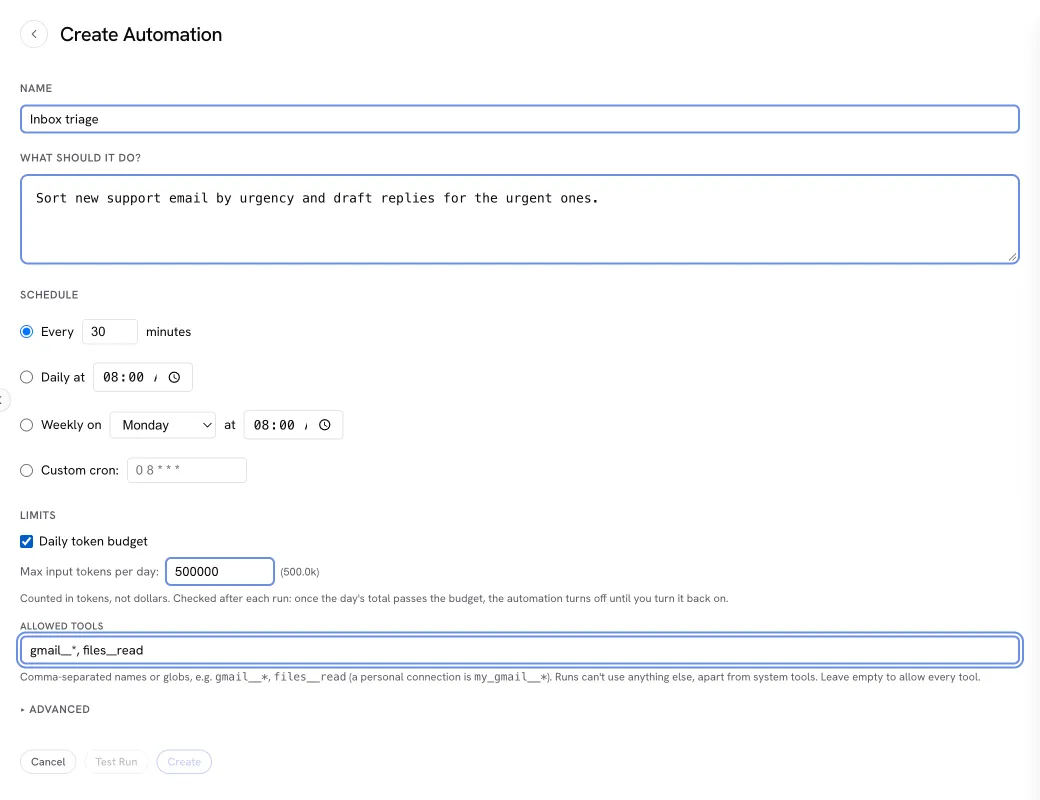
- Token budget — a cap on the tokens (not dollars) a task’s runs use per day or month, or over its lifetime. Every run counts against it, including Run now on a paused task. It is checked before each model call: each step may write only as much as is left of the period’s budget, and a run with too little left for another step stops there, as a
failurewhose error says the budget was reached, and keeps what it did before the stop. An enabled task whose run is stopped that way, or whose period total passes the cap, turns off and stays off until you turn it back on. Run now on a paused task whose total passed the cap is refused until the period resets (for a lifetime budget, until you raise it). - Per-run caps — the most iterations, input tokens, and wall-clock time one run may use. The runtime holds every run to its own ceilings (50 iterations and 10 minutes by default, which an operator can lower with the
tasksblock, and an input-token ceiling only when the operator sets one). A cap set above a ceiling is lowered to it. A run with no input-token cap of its own runs under the operator’s input-token ceiling, or with no input-token cap when none is set. Creating or updating a task reports the caps its runs will actually get, and says when one was lowered. - Allowed tools — tool names or globs the task’s runs may use, such as
gmail__*for a workspace connector’s tools,my_gmail__*for your personal connection, orfiles__readfor a single tool. A run can’t activate or call anything outside the list; onlynb__searchandnb__manage_tools, which find and activate the listed tools, stay available regardless. Add any other system tool a run needs, such asnb__use_skillto load skills ornb__read_resourceto read a connector’s resources. Prefer a<connector>__*glob, since a connector can rename its tools. Leave it empty to allow every tool (through the tools, omitallowedTools, or set it tonullin an update; an empty list is refused). The list can’t include the tools that create, update, or delete tasks, and a run can never run, batch, or judge tasks whatever the list says. A run whose list names a tool it can’t reach, because the connector is missing, disconnected, or not running, doesn’t start: it’s recorded as a failure that names the tool, so a task whose connector was removed stops reading Succeeded.
A shorter tool list also makes each run cheaper, because the model is sent fewer tool definitions.
Describe the job in the prompt (“find the issues opened this week”), not a tool’s name (github__search_issues). A tool’s name depends on how its connector is installed (a personal connection carries my_) and on the connector itself, so a prompt that names one breaks silently when either changes. Put the tools a task needs in Allowed tools instead, where the runtime checks them.
Managing tasks
Section titled “Managing tasks”Browse and manage tasks from the Tasks panel in the sidebar, or ask the agent in chat. Both surfaces let you:
-
List tasks — name, enabled state, schedule, source, last run status, and next run time. Tasks made to be run once with no schedule (one-offs) are kept with their history but left out of the list unless asked for (
kind: "oneoff"or"all"). -
Inspect one task — its full definition (schedule, model, caps, prompt preview) and recent run history with per-run status, start time, iterations, and tool-call counts.
-
Pause a task — disable it without deleting.
-
Resume a paused task — re-enable it on its existing schedule.
-
Trigger an immediate run — bypass the schedule and run now. This runs a paused task too, which is how you test one before enabling it; a paused task is never fired by its schedule or by events. Short runs return the full run record. A run that takes longer than about 30 seconds keeps going in the background: the response says it is still running, with its run id. When every run slot is busy, the response says the run is queued and at what position (see Run slots and the queue). Either way,
tasks__run_resultwith the run id follows it until it ends, andtasks__cancelwith the run id stops it.
The Tasks panel
Section titled “The Tasks panel”The Tasks panel opens on your tasks, most urgent first. A line at the top says how many need you. Each task that does (its trigger was turned off, its runs keep failing, or its last run failed, fell short of its rules, or needs checking) is a card with the reason and a link to the run. Runs going or waiting for a slot follow, each with Watch; then the next few scheduled runs; then every other task with its schedule and when it runs next. Tasks whose trigger you turned off are folded under Paused. Colour and an icon carry each task’s state.
From there, See everything coming up lists your runs in the queue, the scheduled runs over the next 7 or 30 days (a frequent schedule as one row with its count, a rare one by its next run), and the tasks that run on events with their hourly ceiling. See every run lists every run from every source, newest first, back through the whole history, filtered by outcome, task, what started it, and date; a batch is one row you can expand.
Every screen in the panel is a page, and the breadcrumb above it names the pages you came through (Tasks › a task › a run); picking one, or going back, returns to that page. Opening a task opens its page: the task’s state, a status line (trigger, next run, last run), Run now (or Watch while it runs), an Enabled switch for a task with a schedule or event trigger (it gates only the trigger; Run now works either way), and a menu with Run on a list…, Edit, Duplicate, and Delete. Below are what needs doing, the latest result, the recent runs with the pass rate and 30-day cost, and the setup (prompt, input, rules and judge, limits) folded away until you open it. Run now asks for the input first when the task has an input schema. Run on a list takes a JSON array, or CSV whose header row names the input fields.
Opening a run opens its page under its task’s, wherever you opened it from, so the task is always one step back. A run’s page shows its result: the deliverable first (structured output as values and tables), then its assessment with Accept, Reject, a note, and Re-judge, then how it ran, its steps (each tool call in plain words with how long it took, its input and output behind Show details), input, and cost. The editor covers what the task does, its input fields, its criteria, output schema and judge, when it runs, its limits, and a test run of the draft before you save it; accepting or rejecting the test run with a note adds that note as a draft criterion.
Running from an MCP client
Section titled “Running from an MCP client”A remote agent connected to /mcp/<workspace-id> runs a task with tasks__run. Every call answers with the run’s id (runId). tasks__run_result with that runId says whether the run is still queued or running (an answer to poll again, not an error), and once it has ended returns its record and full result. tasks__cancel with the runId stops it. The server’s instructions carry a guide to the task tools, the same one the agent in chat follows.
Every tool names a task by its id (taskId, as tasks__list returns it) and a run by its id (runId).
-
A saved task or an inline one-off. Pass
taskIdto run a saved task. Or passdefinitioninstead:{ manifest, body }, the shapetasks__createtakes, without a name, schedule, orenabled.bodyis the prompt;manifestholds the rest (skill,model,allowedTools,inputSchema,outputSchema,criteria,confidenceThreshold,judge,onPoorResult(see Judging results),maxIterations,maxInputTokens,maxRunDurationMs,tokenBudget). An inline call creates a one-off task with no schedule, owned by you in that workspace, runs it once, and keeps it with its run. Nothing deletes it. -
Input.
inputis any JSON value, at most 64 KiB serialized. When the task has aninputSchema, an input that does not match it, or a missing one, is refused before the run starts, with the reasons. The input is kept on the run record and given to the run as data, inside a block the model is told never to follow as instructions. -
Output schema. When the task has an
outputSchema, the run is told to answer with JSON matching it. The final answer is parsed (a fenced code block is accepted) and checked: the parsed value is kept as the result’sstructured, and the run record says whether it matched (outputSchemaValid) and, when it did not, why (outputSchemaErrors). A mismatch is recorded, not a failure: the run’s status still says how it ended. It makes the run’s assessmentfail(see Judging results). -
Idempotency. Pass
idempotencyKeyto make a call safe to repeat. A later call with the same key for the same task returns the run the first call started, whether it is still running or has ended, instead of starting another. For an inline one-off the key also names the one-off, so a repeat finds the same one-off and the same run.
When you create or update a task with allowedTools, the response warns if an entry matches no tool currently available to the task’s owner in that workspace. The warning appears in the message and as warnings with code allowed_tool_unavailable, one per unmatched entry. The task is saved: you can connect or grant a tool later, or correct the entry. A run with an unmatched entry fails before its first model call. tasks__run and tasks__run_batch responses also carry the warning for saved tasks and inline one-off definitions. Granted personal connectors use my_ names, such as my_granola__*.
As an MCP task
Section titled “As an MCP task”On the 2026-07-28 protocol, a client that declares the MCP tasks extension (io.modelcontextprotocol/tasks) on its call gets a task handle back at once instead of an answer. The handle names the run, and the run’s record is written before the handle is returned, so a lost connection or a restart of the runtime does not lose it. Poll it with tasks/get and stop it with tasks/cancel; only the identity that started the run, in the workspace it started in, can read or cancel it, and anyone else gets “task not found”.
| Run execution | Task status |
|---|---|
| queued, running | working |
completed or incomplete |
completed, with the deliverable and the run record (its assessment and label included) inline |
failed or skipped |
failed, with the run’s reason |
cancelled |
cancelled |
tasks/cancel cancels a queued run or one in flight. When the runtime stops, a run still queued reads failed (it never started), and one in flight reads cancelled, or failed if the process died without stopping.
Task handles are offered on the 2026-07-28 protocol only. On an earlier protocol, or without the extension, tasks__run answers as it always has: the run record when the run ends within about 30 seconds, otherwise a dispatched or queued answer carrying the runId to poll with tasks__run_result.
Run history
Section titled “Run history”Every run is recorded with its status, start and completion times, iteration count, tool calls, and any error. View it in the Tasks panel or by asking the agent. If the runtime restarts while a run is in flight, the orphaned run is swept and marked failed so history stays accurate.
Run history, including each run’s full result, is kept indefinitely. The most recent 1,000 runs of each task are read by default; older ones, with their results, are kept in monthly archives and read a page at a time: tasks__runs filters by the label a run reads as (label: "Needs review" finds the runs waiting for your verdict) or by its verdict, and returns a nextBefore timestamp when older runs exist, and passing it back as before returns the next page, for one task (taskId) or every task. Across every task, a first page read without before sees only the most recent runs, so start with a before just ahead of now to page through everything.
Three more reads summarize your tasks: tasks__upcoming lists the runs holding or waiting for a run slot (with their place in the queue), the fires of timed schedules over the next days (7 by default, up to 30; a schedule firing more than 24 times in that window is one row with its count, and a task whose next fire is past the window still shows it), and the tasks events fire with each one’s hourly ceiling; tasks__stats gives each task’s runs, verdicts, pass rate, and cost since a time (30 days by default); and tasks__judges lists the judge servers connected in the workspace. A task’s own runs may call them.
A run’s status comes from what its tool calls did, not from what its final answer says:
| Status | Meaning |
|---|---|
success |
The run finished and every failed tool call was later retried to success. |
degraded |
The run finished, but at least one tool call failed and no later call to that tool made it good, which usually means part of the work did not happen. The error names each tool and how many of its calls were left failed. Shown as Finished with errors. |
failure |
The run could not finish, it stopped at its input-token cap or its token budget, a connector it called was unreachable, or a tool it called three or more times never once succeeded. |
timeout |
The run hit its duration or iteration limit. |
skipped / cancelled |
The run did not start (already running or queued, the queue was full, the token budget was spent, or it was still queued when the runtime stopped), or was stopped or removed from the queue. The error says which. |
Each run also carries its execution, how it ended in the task vocabulary: completed (success or degraded), incomplete (stopped at its iteration, input-token, output-length, duration, or token-budget limit with a partial deliverable), failed (stopped without one, or a failure the tool calls showed), skipped, or cancelled. It is derived from the status, so the status keeps its meaning: an incomplete run still counts toward the consecutive failures that pause a task exactly as its status did.
A failed call counts as retried when a later call to the same tool with the same input succeeds. When a tool succeeded on only one input in the run, a failure before that success counts as an earlier attempt at it, such as a rejected argument the agent then corrected. A later success with different argument names counts too, since that is the corrected form of a call the tool rejected. Only a later call to the same tool counts, so two healthy patterns still read degraded: a lookup that fails as not found and is followed by a create on another tool, and a fallback to a different tool after one fails. A degraded run does not count toward the ten consecutive failures that pause a task, and does not delay its next run.
Judging results
Section titled “Judging results”A run that ended is not necessarily a good run. A task can say what a good deliverable is, and every run that leaves one is judged against it.
-
Output schema (
outputSchema). Checked first, without a judge: a deliverable that does not match isfail, and no judge is called. -
Criteria (
criteria). Plain-language rules, each typed:Type The judge answers Passes when booleantrue or false the answer equals pass(defaulttrue)scorea level from levels, lowest firstthe level reached is at least pass, a level index (default: the upper half, so two of four levels, or two of three)choiceone of optionsthe answer is passor one ofpass(required)Up to 50 criteria, each with an
id(letters, digits,_ . -) and aruleof up to 4,000 characters. When the judge gives probabilities, a score or choice passes on the probability of a passing answer (at least one half), not on the single most likely answer. -
Confidence threshold (
confidenceThreshold, 0 to 1, default 0.7). A run whose criteria all pass, but where the judge’s confidence on any one is below the threshold, isuncertain, as is a run whose criteria the judge could not answer. Each criterion’s pass rule is separate; the threshold decides onlyuncertain.
The judge, and consent
Section titled “The judge, and consent”The runtime has no judge of its own. A judge is an MCP server the workspace connects, like any connector, that exposes the judge and list_judges tools of the judge tool contract. Connecting one is the workspace’s decision to send it data: for each judged run it receives the criteria, the run’s input, the deliverable, and a summary of the run’s tool calls (each tool’s name, whether it worked, and the first 200 characters of its input and of any error). The state sent is capped at about 48,000 characters (the input to 8,000, the tool-call summary to 8,000, the deliverable to the rest); anything cut is marked, and the assessment says the state was cut. Nothing connects a judge for you.
With one judge server connected, it is used. With more than one, name it in the task’s judge.server; judge.id and judge.options pick one of that server’s judges and its settings. With none connected, or more than one and none named, a run with criteria is recorded uncertain with that reason and no criterion answers, so it reads Needs review; its output schema is still checked. Creating, updating, running, or batching a task with criteria when the workspace has no judge it can use still saves and runs it, and the answer carries a warning, in its message and as warnings (no_judge, judge_ambiguous, or judge_not_found), saying its runs cannot be judged, and read Needs review, until a judge is connected or named.
The judge is called as the task’s owner, in the task’s workspace, through the same gates as any tool the run calls. If it is briefly unavailable (rate_limited, upstream_unavailable, upstream_timeout), the call is retried three times over about 30 seconds; any other error is recorded at once. Either way the run is uncertain with the reason (reason.code, such as no_judge, judge_error, or judge_unavailable) and no criterion answers: a run whose criteria were never judged is never read as passed. How the run ended is never changed.
How a run reads
Section titled “How a run reads”A run’s assessment is pass, fail, uncertain (the judge’s confidence was below the threshold, or the judge could not answer), or not_assessed (the task has no output schema and no criteria, so there was nothing to check), recorded on the run with each criterion’s answer, pass or fail, confidence, and the judge’s rationale, plus which judge answered and the tokens it reports. The run list, a run’s result, and the Tasks panel show one label derived from how the run ended and its assessment:
| Label | When |
|---|---|
| Succeeded | completed, assessment pass or none, and no tool call left failed |
| Poor result | completed or incomplete, assessment fail |
| Needs review | assessment uncertain; incomplete with no failing criterion; or completed with a tool call left failed and no failing criterion |
| Failed, Skipped, Cancelled, Queued, Running | how the run ended |
The label is computed when it is read, never stored.
Your verdict
Section titled “Your verdict”Accept or Reject on a run in the Tasks panel, or tasks__assess with { runId, verdict: "pass" | "fail", note? }, records your verdict beside the judge’s. It replaces the judge’s in the label: a rejected run reads Poor result, and an accepted one Succeeded unless it was incomplete or left a tool call failed. The record says who set it and whether it came from the Tasks panel (ui) or another client (remote). After editing a task’s criteria or schema, tasks__assess with { runId, reassess: true } judges a run again and keeps your verdict. A task’s own runs cannot call tasks__assess.
After a poor result
Section titled “After a poor result”onPoorResult says what a fail does:
notify(the default): a notification in the workspace inbox saying a task run had a poor result, with the run’s id, which the workspace’s notification routes can deliver. Every member of the workspace can read the inbox and a task is private to you, so the notification names no task, criterion, or rule and carries nothing of the deliverable; open the run in the Tasks panel (ortasks__run_result) for the detail.record: nothing beyond the assessment.retry_once: the task runs again, once, with the same input and the failed criteria given to it as guidance. The retry is an ordinary run (it takes a run slot and counts against the token budget) and recordsretryOf. If the retry fails too, or cannot start, the same notification is written instead.
An uncertain run sets off nothing, including one the judge could not answer; it reads Needs review until you accept or reject it.
Batches
Section titled “Batches”A batch runs one task over many inputs: one run per item, under one concurrency limit, one budget, and one stop rule. Start one with tasks__run_batch; it answers at once with the batch, and the runs go on in the background.
-
What it runs.
taskIdnames a saved task, or passdefinitionexactly as fortasks__run(onPoorResultaside, which batch runs ignore), which creates a one-off task for the batch. Each item’s run reads the task as it is when the run starts, so editing the task while a batch runs changes every item not yet started. -
Items.
itemsis a list of inputs, one run each: at most 10,000, each at most 64 KiB serialized and 16 MiB together. Every item is checked against the task’sinputSchemabefore anything is created. If any item would be refused, the whole batch is refused, the error names the first few bad items by index and says why, and nothing runs. -
Concurrency.
concurrencyis the most of the batch’s runs asked for at once (queued or running). It is held to the runtime’s concurrent-run limit (tasks.maxConcurrentRuns), which is also the default, and the answer says when it was lowered. Each run still takes a run slot like any other, so the fair share between workspaces applies on top: another workspace’s run gets the next free slot instead of waiting for the batch to finish. When the queue is full, the batch waits a few seconds and asks again; no item is skipped for it. -
Budget.
budgetUsdcaps what the whole batch spends, in dollars at the model’s rates. It is checked before every model call across all of the batch’s runs at once, so runs in flight together cannot pass it. Each call reserves its worst case against the budget while it runs, so a run can be refused only because another run’s reservation holds what is left: the item then waits for that run to end and runs after it, without pausing the batch. When the budget itself has too little left for another call, the run stops there and no new item starts: the batch pauses with reasonbudget. Runs still waiting for a slot are taken back, and an item stopped before it produced anything waits to run again; resume the batch with a raised budget to go on. A model with no known rates cannot be priced, so on such a model no call fits a budget and the batch pauses at its first call. The task’s own token budget still applies to each run, and a run stopped by it pauses the batch the same way. -
Stop rule.
stopWhen: { minPassRate, afterItems }pauses the batch, with reasonpass_rate, when its pass rate falls belowminPassRateafterafterItemsassessed runs. The pass rate is pass / (pass + fail):uncertainresults are left out, so judge doubt alone never pauses a batch. A task with no criteria and no output schema is never assessed, so a stop rule on it is refused. Resuming after the rule fired turns it off for the rest of the batch. -
Idempotency.
idempotencyKeymakes the call safe to repeat: a later call with the same key returns the same batch. The same key with a different task or a different number of items is refused.
A batch that pauses on its own (budget or stop rule) writes a notification to the workspace inbox. Like a poor result, it names no task, rule, input, or deliverable: only the batch’s id, why it paused, and its counts. A run of a batch item sets off no onPoorResult of its own; the stop rule and Re-run failed take its place.
Following and controlling a batch
Section titled “Following and controlling a batch”tasks__batch with the batch’s id returns its state (running, paused, completed, cancelled), why it paused, its counts (pending, queued, running, pass, fail, uncertain, not_assessed, failed, skipped, cancelled), what it has cost, and its pass rate. With results: true it also returns item results a page at a time (50 by default, limit up to 500, the next page from nextCursor): each item’s index, a preview of its input, its run’s id and label, its verdict, its cost, and the top-level fields of the run’s structured output. filter narrows the results to one state, and failing selects items judged fail or whose run failed. tasks__batches lists your batches, newest first. Each item’s run is an ordinary run that records its batchId and batchIndex; tasks__run_result reads it by run id, and tasks__runs with excludeBatchRuns: true leaves batch runs out.
tasks__batch_control acts on a batch:
| Action | Does |
|---|---|
pause |
No new item starts. Runs still waiting for a run slot are taken out of the queue (recorded skipped) and their items wait to run again; runs in flight finish. A paused batch whose last runs finish with nothing left to run is completed. |
resume |
Items start again. With budgetUsd, under a new budget (more than already spent): only a paused batch takes one, so pause a running batch first, and a new budget is refused while runs that share the old one are still in flight. |
cancel |
Stops the batch for good: queued runs are taken out of the queue and runs in flight are stopped, all recorded cancelled, and items not yet started are cancelled. |
rerun_failed |
Runs every item whose run failed, was skipped or cancelled, or was judged fail again, each as a new run. The item keeps its earlier run ids (previousRunIds) and adds the new run’s cost to its own. |
In the Tasks panel, each batch is one row in the list of every run, with its progress, counts, cost, and state, and its item runs are not listed separately. Open one for its results table, with the output’s fields as columns, each item’s verdict and cost, and its run’s output; filter it to failing items, and pause, resume, cancel, or re-run failed items from its header.
If the runtime restarts
Section titled “If the runtime restarts”A batch’s record and its items are kept beside the task’s runs. When the runtime starts, every unfinished batch is reconciled from its items: an item whose run was still queued is asked for again (its old run is recorded skipped), an item whose run was in flight is recorded failed, since the run ended with the process (cancelled when the runtime stopped cleanly and stopped the run), and is picked up by Re-run failed. Counts and cost are rebuilt, and running batches carry on. What a run in flight had spent before the process died is read from the usage ledger, which records every model call as it completes, and still counts against the budget.
What’s next
Section titled “What’s next”- Chat — the interactive counterpart to a scheduled run
- Connectors — install the connectors a task posts to in its own workspace
- Workspaces — workspace ownership and the per-workspace wall