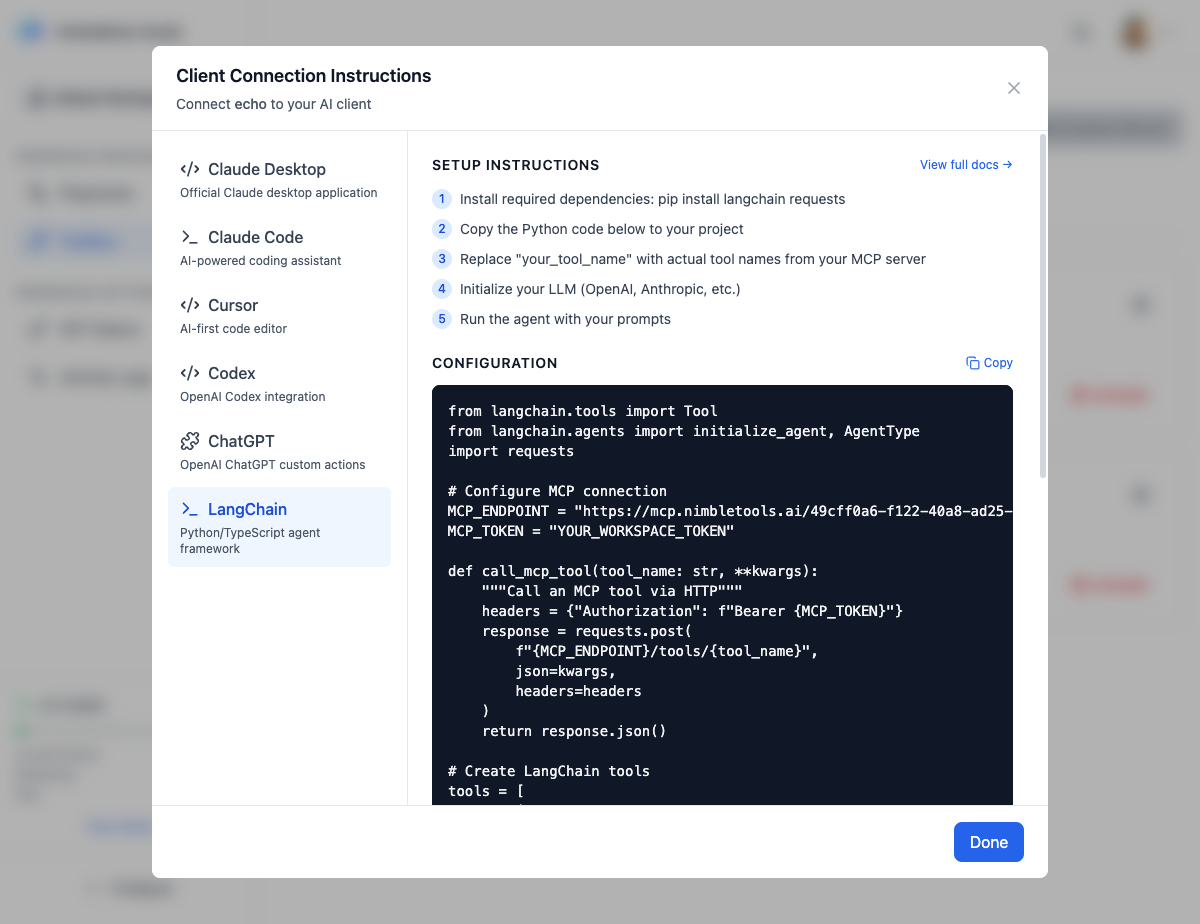
Integrate your deployed MCP servers with LangChain to build powerful AI agents and workflows in Python or TypeScript.
Overview LangChain is a framework for developing applications powered by language models. By connecting your MCP servers to LangChain, you can create agents that leverage your custom tools alongside LLM capabilities.
Setup Instructions
Install required dependencies
Run: pip install langchain requests
Copy the Python code below to your project
Use the generated Python integration code
Replace tool names with actual names from your MCP server
Update the tool configuration to match your server’s tools
Initialize your LLM (OpenAI, Anthropic, etc.)
Set up your preferred language model
Run the agent with your prompts
Execute the agent with your queries
Python Integration Code from langchain.tools import Tool from langchain.agents import initialize_agent, AgentType import requests # Configure MCP connection MCP_ENDPOINT = "https://mcp.nimbletools.dev/{workspace-id}/{server-name}/mcp" MCP_TOKEN = "YOUR_WORKSPACE_TOKEN" def call_mcp_tool ( tool_name : str , ** kwargs ): """Call an MCP tool via HTTP""" headers = { "Authorization" : f "Bearer { MCP_TOKEN } " } response = requests.post( f " { MCP_ENDPOINT } /tools/ { tool_name } " , json = kwargs, headers = headers ) return response.json() # Create LangChain tools tools = [ Tool( name = "echo" , func = lambda ** kwargs : call_mcp_tool( "your_tool_name" , ** kwargs), description = "Access echo MCP server" ) ] # Initialize agent agent = initialize_agent( tools, llm, agent = AgentType. ZERO_SHOT_REACT_DESCRIPTION , verbose = True )
Replace your_tool_name with actual tool names from your MCP server’s documentation.
Getting Your Configuration
Navigate to Connections
Go to the Connections section in NimbleBrain Studio
Find Your Server
Locate the MCP server you want to connect
Click Connect
Click the Connect button on the server card
Select LangChain
Choose “LangChain” from the integration options
Copy Code
Copy the generated Python code to your clipboard
Complete Example Here’s a complete example using Claude and a knowledge base MCP server:
from langchain.tools import Tool from langchain.agents import initialize_agent, AgentType from langchain_anthropic import ChatAnthropic import requests import os # MCP Configuration MCP_ENDPOINT = "https://mcp.nimbletools.dev/ws-my-workspace-550e8400-e29b-41d4-a716-446655440000/knowledge-base/mcp" MCP_TOKEN = os.getenv( "NIMBLEBRAIN_TOKEN" ) def search_knowledge_base ( query : str ) -> str : """Search the knowledge base for relevant information""" headers = { "Authorization" : f "Bearer { MCP_TOKEN } " } response = requests.post( f " { MCP_ENDPOINT } /tools/search" , json = { "query" : query}, headers = headers ) result = response.json() return result.get( "content" , [{}])[ 0 ].get( "text" , "No results found" ) # Define tools tools = [ Tool( name = "search_knowledge_base" , func = search_knowledge_base, description = "Search the company knowledge base for information about policies, procedures, and documentation" ) ] # Initialize LLM llm = ChatAnthropic( model = "claude-3-5-sonnet-20241022" , anthropic_api_key = os.getenv( "ANTHROPIC_API_KEY" ) ) # Create agent agent = initialize_agent( tools = tools, llm = llm, agent = AgentType. ZERO_SHOT_REACT_DESCRIPTION , verbose = True , handle_parsing_errors = True ) # Run the agent response = agent.run( "What is our vacation policy?" ) print (response)
TypeScript/JavaScript Integration You can also use MCP servers with LangChain.js:
import { Tool } from "langchain/tools" ; import { initializeAgentExecutorWithOptions } from "langchain/agents" ; import { ChatAnthropic } from "@langchain/anthropic" ; // MCP Tool wrapper class MCPTool extends Tool { name = "search_knowledge_base" ; description = "Search the company knowledge base" ; private endpoint : string ; private token : string ; constructor ( endpoint : string , token : string ) { super (); this . endpoint = endpoint ; this . token = token ; } async _call ( query : string ) : Promise < string > { const response = await fetch ( ` ${ this . endpoint } /tools/search` , { method: "POST" , headers: { "Authorization" : `Bearer ${ this . token } ` , "Content-Type" : "application/json" }, body: JSON . stringify ({ query }) }); const result = await response . json (); return result . content [ 0 ]?. text || "No results found" ; } } // Initialize const tools = [ new MCPTool ( "https://mcp.nimbletools.dev/ws-my-workspace-550e8400-e29b-41d4-a716-446655440000/knowledge-base/mcp" , process . env . NIMBLEBRAIN_TOKEN ! ) ]; const llm = new ChatAnthropic ({ modelName: "claude-3-5-sonnet-20241022" , anthropicApiKey: process . env . ANTHROPIC_API_KEY }); const agent = await initializeAgentExecutorWithOptions ( tools , llm , { agentType: "zero-shot-react-description" , verbose: true } ); // Run const result = await agent . call ({ input: "What is our vacation policy?" }); console . log ( result . output );
Advanced Features Multiple MCP Servers Connect multiple MCP servers as different tools:
tools = [ Tool( name = "search_docs" , func = lambda q : call_mcp_tool( "docs" , "search" , query = q), description = "Search documentation" ), Tool( name = "query_database" , func = lambda q : call_mcp_tool( "database" , "query" , sql = q), description = "Query the database" ), Tool( name = "send_email" , func = lambda to , subject , body : call_mcp_tool( "email" , "send" , to = to, subject = subject, body = body), description = "Send an email" ) ]
Error Handling Add robust error handling:
def call_mcp_tool ( server : str , tool_name : str , ** kwargs ): """Call an MCP tool with error handling""" try : endpoint = f "https://mcp.nimbletools.dev/ { WORKSPACE_ID } / { server } /mcp" headers = { "Authorization" : f "Bearer { MCP_TOKEN } " } response = requests.post( f " { endpoint } /tools/ { tool_name } " , json = kwargs, headers = headers, timeout = 30 ) response.raise_for_status() result = response.json() return result.get( "content" , [{}])[ 0 ].get( "text" , "No response" ) except requests.exceptions.Timeout: return "Error: Request timed out" except requests.exceptions.HTTPError as e: return f "Error: HTTP { e.response.status_code } " except Exception as e: return f "Error: { str (e) } "
Caching Cache MCP tool results for better performance:
from functools import lru_cache @lru_cache ( maxsize = 100 ) def call_mcp_tool_cached ( tool_name : str , query : str ): """Call MCP tool with caching""" return call_mcp_tool(tool_name, query = query)
Troubleshooting
Possible causes:
Invalid or expired token
Token not set in environment
Solution:
Generate a new token in Studio
Set NIMBLEBRAIN_TOKEN environment variable
Verify token has correct permissions
Possible causes:
Server not running
Network issues
Long-running tool
Solution:
Check server status in Connections
Increase timeout value
Verify network connectivity
Possible causes:
Unexpected response format
MCP server error
Missing content field
Solution:
Add error handling for JSON parsing
Check MCP server logs in Studio
Verify API endpoint is correct
Best Practices
Store sensitive data in environment variables: MCP_TOKEN = os.getenv( "NIMBLEBRAIN_TOKEN" ) if not MCP_TOKEN : raise ValueError ( "NIMBLEBRAIN_TOKEN not set" )
Always handle potential errors gracefully to prevent agent failures.
Enable verbose mode during development: agent = initialize_agent( ... , verbose = True )
Connections Install and manage MCP servers
API Tokens Generate workspace tokens
All Integrations View all client integrations
Activity Logs Monitor server usage